

I had 5,042 unread newsletter emails. All from the great writers I follow and subscribed on purpose. But even the best writer may send me something I do not want to read. Maybe not right now, or maybe not at all.
It may be a post that is just outside my interests, or current goals. OR a post that is focused too much on the marketing campaign the writer is running. Whatever it is, I want to use my time well.
I’m a Staff Software Engineer in the AI era. I need to keep up with a lot of tech stuff - and there is no way I am able to read everything.
I have ~90 minutes a night for my business, after the day job and after the kids are asleep. You can do the math - it says: “You’ll never catch up”.
So I had two options:
Unsubscribe from half and hope I cut the right half.
Build something that reads them before I do - and only read the best picks myself.
I’m an engineer. You know which one I picked.
In this article
Not so far ago I posted a screenshot of the pile and asked “Do you want it?”.
Ten days later it was running on my own inbox on its own, twice a day. So I gave it to my paid subscribers.
This is the whole story. What I built, why, how it works, and what shipping it taught me. Here is a TLDR of what you’ll find in the article below:
What I built: Newsletter Triage - automatic quality filter for newsletters.
How it works: Runs locally or on GitHub Actions (privacy focused - you own it). It connects with your mailbox, pulls only what’s needed, AI judges against YOUR rubric.
Why I trust it: before I switched it on, it agreed with my own verdicts 13 times out of 14. Processed my 5042 unread emails with astonishing accuracy. Approximately 1 of 4 is gave me as a banger.
My exact setup: Github Actions, Gmail filter to label all newsletters.
How it impacted my week: I’m actually reading now what my fellow creators send!
How to can get it: Buy it once as standalone lifetime licence or become the paid subscriber of Engineer of Wealth.
What I built
Because of the time limitations I have every day to process the content, I needed a gate, that will reduce the input amount that require my attention. I do this in many fields, like filtering out GitHub notifications, or disabling all social media notifications from my phone. This time I focused on newsletters.
Automatic Quality Filtering
Newsletter Triage is the little but smart applications, that reads every newsletter BEFORE you do, judges it against a rubric YOU write, and applies one of four labels.
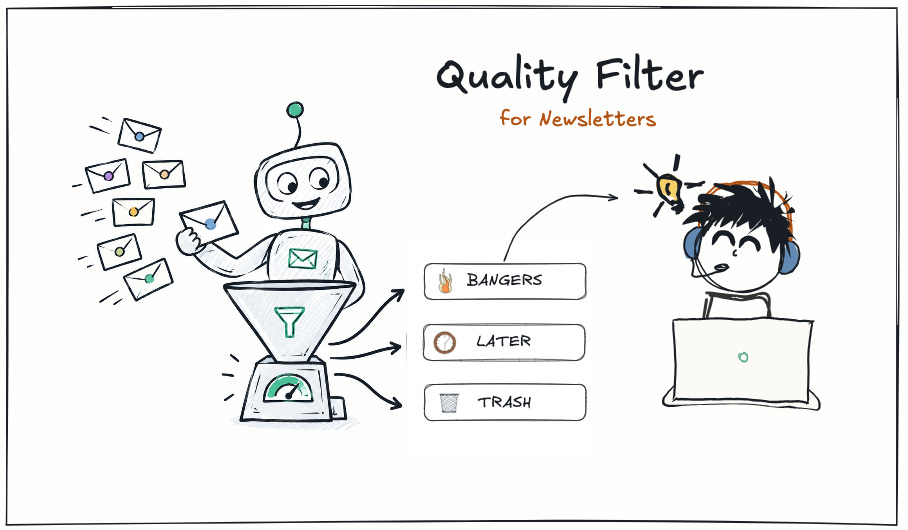
banger: read it now.
maybe later: good, high quality, read when you have a time.
trash: not for you. Not now, most likely never.
unrecognized: the judge couldn’t assess it honestly, so it says so instead of guessing
Nothing gets deleted. NOTHING. In the worst case, you will not read something mislabelled, figuring it out in the future - which is still better as never reading anything because of the content flood.
Here is how the mailbox looked after a few days of running through my pile of unread emails.
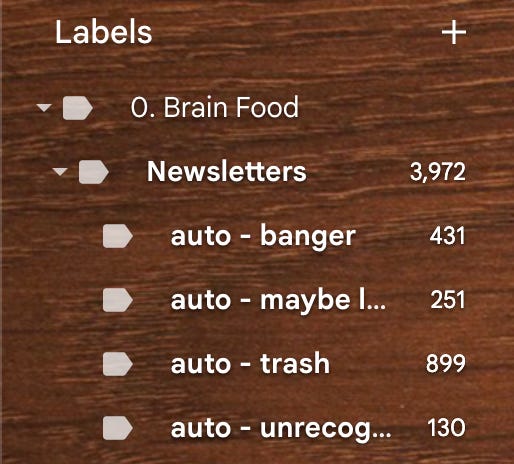
Senders tracker
The categorisation was the main feature, but I quickly figured out, that there may be some old newsletters that are completely out of my current interests nowadays, and therefore it would be nice to just get a recommendation what to unsubscribe from.
I didn’t expect to love that part the most. Your newsletter triage keeps a ledger of the senders, and counts how many emails fell into each category. That enables you to do fancy recommendations, like:
who you should unsubscribe from (nearly always trash)
who you should pay for (nearly always a banger)
The first one saves you money - if sth is always out of your priorities, or always low quality, there is no point to send it through the filter at all.
The second one is the reason I’m now paying for a newsletter I had ignored for months. If a sender gives me great value for free, first of all, I want to appreciate them by little support, but secondly, there is a great chance I’ll get even bigger value from paying for premium content.
So here is the snapshot of how triage senders --sort best looks like.
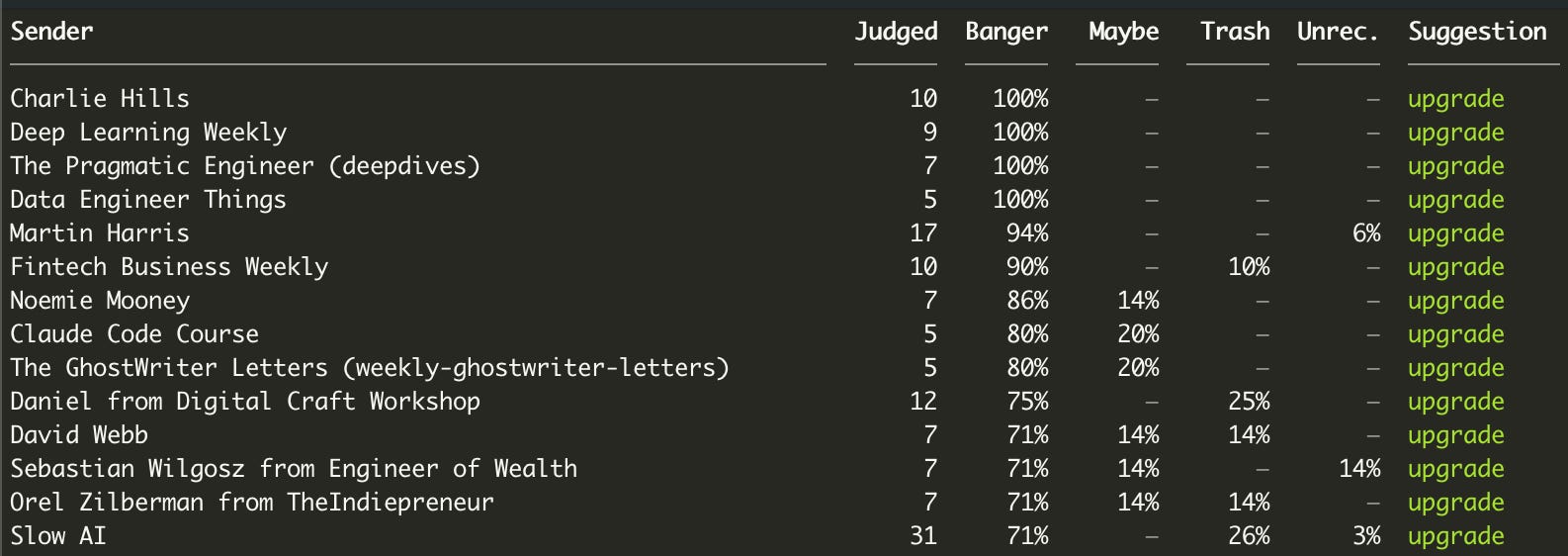
DISCLAIMER: “Trash” here doesn’t mean that emails are bad quality - they just mean, they most likely won’t ever be relevant to ME personally, based on the specific criteria.
Privacy-focused
If you follow me for a while, you know I’m a Staff Engineer at FinTech company - and we’re all here getting crazy about privacy, so all my tools naturally follow that convention. I shipped Newsletter Triage in a way you own it fully.
You get access to the repo.
You clone it and setup personal version - claude will do it for you
You hook up YOUR OWN mailbox - I recommend gmail but any will do.
You run it locally or on GithubActions.
You hook up own AI API key for the judgement.
Everything what’s getting saved in the repo is encrypted.
After you get it, you own it. Totally and fully.
So yeah, no personal information saved in the repo, no keys, no external servers processing and storing your data - the ONLY thing is the AI judgement you setup. The only email access is the tool call to pull emails properly labeled.
OK, but why not just use Gmail filters?
Gmail filters match only senders and keywords. The functionality is very narrow. I use filters to push all my newsletters into dedicated folder (Labelling them), named Newsletters. But I cannot use filters to score on quality, relevance, match to my current year’s goals.
That’s where my tool comes in handy.
The question I actually wanted to have answered is: does this specific email deserve my evening RIGHT NOW?
That’s a judgment task, and this is where LLMs are good at - if you feed them with information what you care about.
How it works
In the era of AI, building is cheap. I know it better than anyone else, as I’m building for living and I mean it. I did not ship here anything you cannot build yourself - it’s all about how you value your time.
For me, the rubric is the whole product. Everything else is plumbing. I played with different scoring systems, calibrated it, tested against 5k+ newsletter emails, so you get a tool that just works, and you only need to personalise to your needs.
It’ll be at least week of work saved. As an engineer, I know how much it costs.
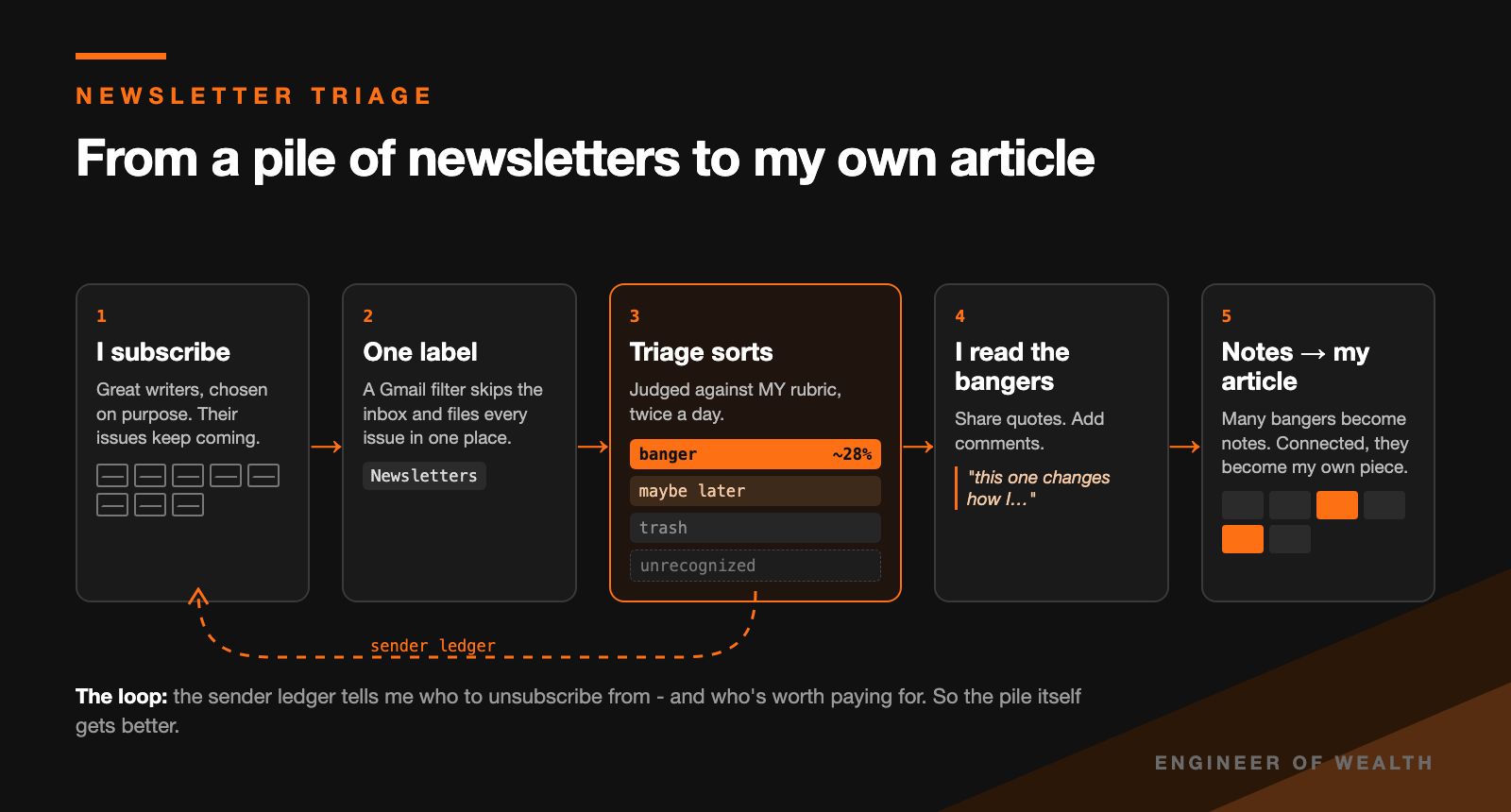
So here is the detailed breakdown of the mechanism behind it.
Does it actually work?
Before I let it touch my real inbox, I labelled emails by hand and compared with the judgment call.
Haiku agreed with me 3 times out of 7. It is cheaper, but its scores seemed random.
Sonnet agreed with me 6 of 7, then 13 of 14 after a week of rubric edits.
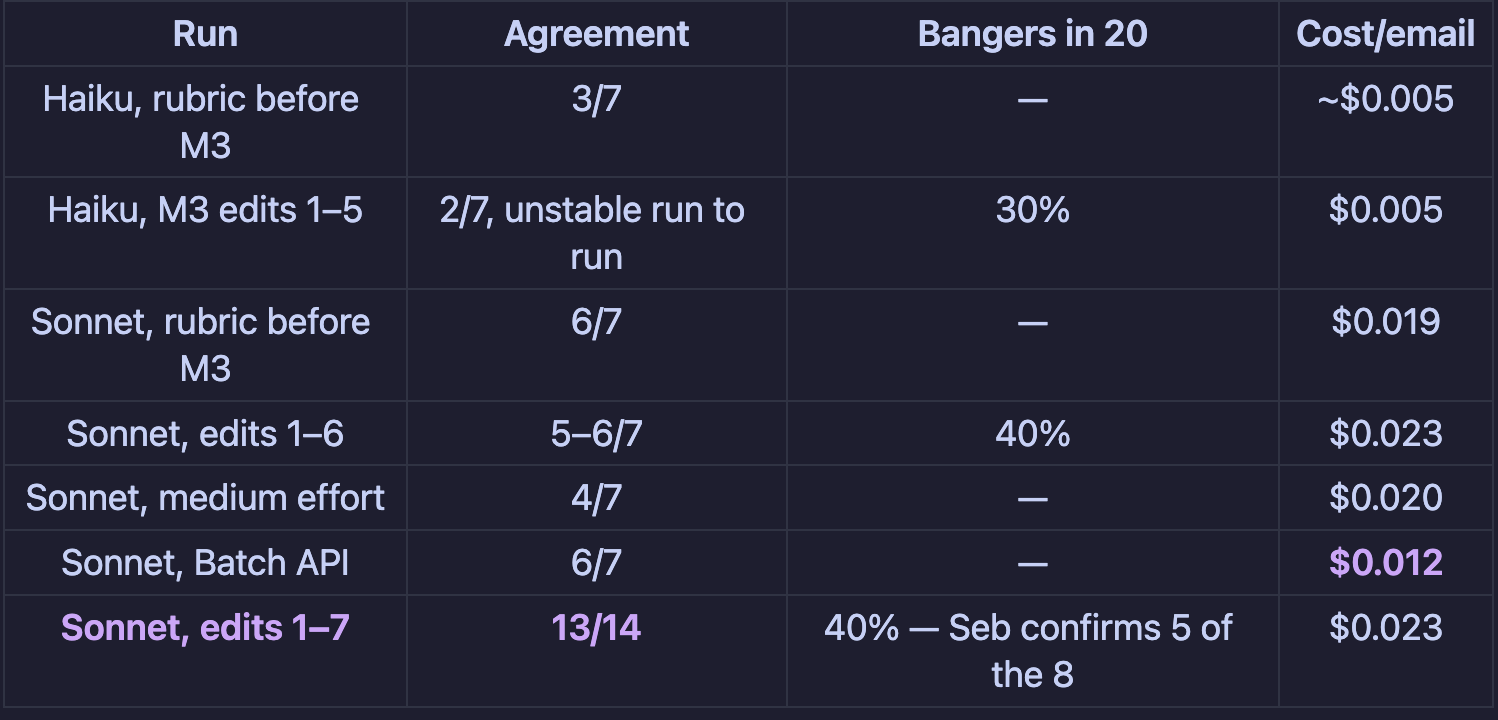
Then my own cost model was wrong by 3.5x.
I assumed 1,700 input tokens per email. Reality proved: 4,396.
I assumed 150 output tokens. Rality: 872.
I’m a huge fan of the engineering approach to problem solving - whatever you won’t measure, you can’t improve. That’s why every number in this post is measured by me, and all the calibration logs were saved.
My Life run categorised 28% emails as bangers. My target was 15–20%.
Is that a failure? Honestly... no. Every newsletter in that folder is one I chose because it’s good. A high hit rate on a hand-picked list is the list doing its job.
It also means, 28% is 72% less emails to read. And for me it’s a win.
Shipping it was harder than building it
I kind of expected that already, after shipping the Ship & Sell starter Kit before. The tool worked on September 23 already. BUT making it safe to hand to another person took another week, and one more for extra privacy testing & initial setup walkthrough.
Here are the lessons worth saving if you want play with products as a source code.
1. Read access exposes every commit. I had genericised an example rubric, but the original, with details about my kids, was still in git history. Anyone with access could read it and that’s not something I’m willing to allow. Fixing the files is not fixing the repository and while I do know that, currently when working with AI, we need to be aware, that any single step we order it to do, it may skip. I squashed the history, and now a privacy check scans every commit against a list of 411 personal terms before it’s allowed in.
2. I built the product in my personal copy of the repo. Three milestones of features existed only in my own instance and had to be ported, commit by commit. This was AGAIN, AI making wrong assumptions and ignoring my initial specifications. Now there are two repos and a hook that refuses product code in the personal instance.
3. An independent review before the first release found 6 real bugs. That included a dry run that would pay for the same emails twice. Before shipping anything, I totally recommend spawning 10 independent agents to focus on different angles of the project to find out overlooks, potential improvements and strict failures.
4. Running the buyer’s setup on my own machine found a bug every buyer would hit. Developer path ≠ buyer path. The learning is to dogfood the second one. This is why I’ll keep pulling the version that people are running every once a while, to go through the initial setup path too.
5. GitHub ignores read-only access on personal accounts. Every buyer would get WRITE access and see every other buyer. I found it in the docs before the first grant, not after, fortunately - but that’s why product now lives under an organization. Worth noting :).
6. The checkout platform decides how much of delivery is manual. For this I’ve switched from LemonSqueezy to Polar, because Polar connects the buyer’s GitHub at checkout and grants access itself. LemonSqueezy would require me to copy usernames by hand - OR build automation myself. Both cases are not something I’m willing to do, becuase if someone built sth, I see no reason to build it again.
All of them are about the boring last mile, the part between “it works for me” and “you can trust it”. Shipping a product takes nowadays at least similar amount of time that building it.
And this is the part nobody puts in the demo video.
Who it’s for (and who it’s not)
Now the best part. Is it for you?
It’s for you if you subscribe to newsletters with purpose - not randomly hitting “subscribe”, and never intend to read anything.
If you read them to get better at your work, and you’re comfortable cloning a repo and running a few commands (or at least ask Claude to do it for you) - then go with it.
It’s for you if you want to use your AI subscriptions efficiently. I pay ~$400/m for a Claude subscriptions, so I do want to only use it for what matters - and if somebody can use their subscriptions to build useful tools for me, I’m more than happy.
When IT is NOT for you?
It’s not for you if you want to build yourself everything. If you don’t see a value in other people building tools you can use right away, I don’t mind.
It’s NOT for you if you want an app with a login screen. There’s no hosted service. You’ll need
a terminal,
a GitHub account
and an Anthropic API key.
It’s self-managed, I don’t do setup support unless you want to pay $1k+ for hiring me up for an hour.
That’s a feature, by the way. Your mail goes from your mailbox to the AI provider you choose. It never goes through me.
It’s included for every paid subscriber of Engineer of Wealth, with updates for as long as you’re subscribed. You keep your copy forever.
CTA decision — Sebastian, before publishing
The Launch Plan gates the public standalone announcement (Phase 2b, from 2026-10-12) on one outside adopter passing a dry run. 1.2.0 (the pre-launch blockers) is tagged and pushed, so the code gate is met; the adopter gate is not.
Option A (recommended): keep the CTA paid-only as written above. Sunday’s article drives paid subs; the $49 standalone opens with the public launch.
Option B: add the line below now and treat this article as the public launch.
If you’d rather not subscribe, it’s also $49 one-time: https://buy.polar.sh/polar_cl_8n3Nvo9pAWDhbUy0vtigWqQAb0LXdOo2O3iFY3l7Zqr
Below, for paid subscribers: my exact setup, the config I run, how I calibrated the rubric step by step, and what the first week actually did to my inbox and my evenings.
:::paywall:::
My exact setup
Here’s what runs on my inbox right now. Copy what’s useful.
What it did to my week
What I can tell you from the numbers:
~600 emails filed by the end of day one. The backlog drains by about 200 a day on its own.
Currently, over 1500 emails I didn’t have to open just to find out they weren’t for me. At a generous one minute each, that’s ~25 hours. At my day-job rate, ~$2k of time. For a few dollars of API calls.
10 unsubscribe candidates from the first 300-email dry run, out of 123 senders.
4 upgrade candidates. One of them is Kevin Szabo’s Writing Chronicles. I’d been skimming it for months; the tool flagged it as nearly always a banger. That’s the signal to pay for it. And there are others, like Digital Craft Workshop which I also became paid subscriber recently.
So yeah. At least for myself, I call it a success. And if you’ll try it, let me know how it affected your week!
How to get it
If you’re a paid subscriber, it’s yours:
Just Open the perk.
Claim it, connect your GitHub, accept the repo invitation
Follow the README quickstart: mailbox first, then
triage init
You’ll need ~an hour for the first setup, plus a GitHub account, an Anthropic API key with a few dollars of credit, and Python 3.11+.
Are you stuck? Open an issue on the repo. Every question I get becomes a README line or a doctor check, so the next person doesn’t hit it.
And reply to this when you get your first digest. I want to know what your rubric looks like... and what it caught that you’d have missed!