

Hi there! You may wondering: Why another AI tool list in the sea of comparison articles out there? And this is fair concern, so let me explain shortly.
I’m engineering my way to $1M in public, and AI tools and workflows are very big chunk of my life nowadays. I have day-job and ~90 minutes a day to build the business online.
Initially, as with everything, I was hyped on trying out new tooling, but quickly realised, that this leads to quick burnout and nothing else.
Here is my concern.
With AI you can build quickly - so people do it.
Nowadays building is solved for a big chunk of work, especially for personal tooling, small workflow simplifications and one-person startups. I covered this concept briefly in my other article: Building is solved, selling is not , so I won’t repeat here. Just let me say one thing about tooling:
There is a survey made by DX. They tracked AI tool usage across 135,000 developers from 435 companies.
The average time saved by AI tooling was ~3.6h per week, which is great, but that’s just a first part of the conclusion. The data stayed flat at around four hours even as adoption soared.
More tools equal same savings.
The thing is, we’re getting flooded in new AI toolsets every single day, but there is a limit of what we can use efficiently. The conclusion for me is exactly the same as I claimed 10 years ago:
Master your tooling instead of chasing new shiny things
This list vs Roundups
Given my time constraints I can’t evaluate tools & apps the way the roundups do and I don’t even want. Matt Wolfe ships a list every week and The Rundown ships one every morning, but both cover more sth like: “what exists out there” and both are made to answer completely different question.
Look for those if you want to check “what’s new, what’s possible” - in order to get inspired.
Read below, if you want to get the idea of: “What this guy is actually using when he advances on his journey to $1M”.
This list is narrow, and it is meant to be, because it answers a single question you should also ask before installing new app:
Does this give back more time than it costs to learn?
Most tools are never going to the next stage, because they fail on this single-question evaluation bar.
A tool that saves me 20 minutes a week but takes six hours to set up breaks even in five months, and if you add to it the actual cost in case this is paid too, then paying for itself takes even longer.
I’ll forget twice why’ve installed it by then!
I would like to be juggling a handful of tools instead getting flooded with them.
So here is the list that help me build my side-business and keep my sanity at the reasonable levels.
Note: If a tool provides an affiliate link, it’s included, because why not?
Actively used
Wispr Flow. I talk, it types.
I use Wispr Flow daily on both - my computer and phone. Even though I’m a coder and native keyboard typer, dictation speeds up my input 2x while removing completely the problem of typos and saving my fingers from overload.
Currently a lot of communication with Claude happens through me spelling out what I want. and my content drafts and raw ideas are also just dumped out of my mind while I’m walking.
WriteStack, feeding Substack and Buffer.
I refuse to post daily, making myself a content hamster, instead of entrepreneur. Therefore, I do time-boxing and put my activities in batches so I can write notes and short-form posts once and schedule them for multiple days in advance.
For that, I use Writestack, which allows me to quickly schedule shortforms on substack using the predefined schedule, so I can stop worrying about those being written and lost forever.
I also use it to extract some notes out of the articles I write. The key thoughts I want them to be repurposed across multiple platforms. Absolute gem and time saver.
Turning a full-time job’s worth of context into decisions
Claude Code with custom agents and skills.
This is the one that changed the shape of the week, not just the speed of a task. I stopped using AI as a chat window and started encoding my own business into it: a CEO agent for strategy, a COO for planning, a Ghost that writes in my voice, and around 50 skills that are just my own repeated processes written down once.
The unlock wasn’t the model. It was realizing that every time I explained my business context to an AI, I was paying that cost again. Now it reads plan.md and audience.md and knows more about my positioning than I can hold in my head at 21:00 on a Tuesday.
Cost to learn: high. Genuinely high. This is the one exception to my own rule, and I want to be honest that it took [CONFIRM: how many evenings?] before it paid back.
What it replaced: the two hours a week I used to spend re-briefing a chat window.
Obsidian Second Brain fuelled by Readwise
Highlights from articles, books, podcasts, videos and tweets land in my vault automatically. I use Readwise Reader app to feed in all my newsletters and highlight hem, but anything, like web clips, video reviews and my rough ideas got into my Obsidian through automation.
I never care about this part, read whenever I happen to be at the moment, and whatever I highlight or bookmark, will reach my Obsidian at some point.
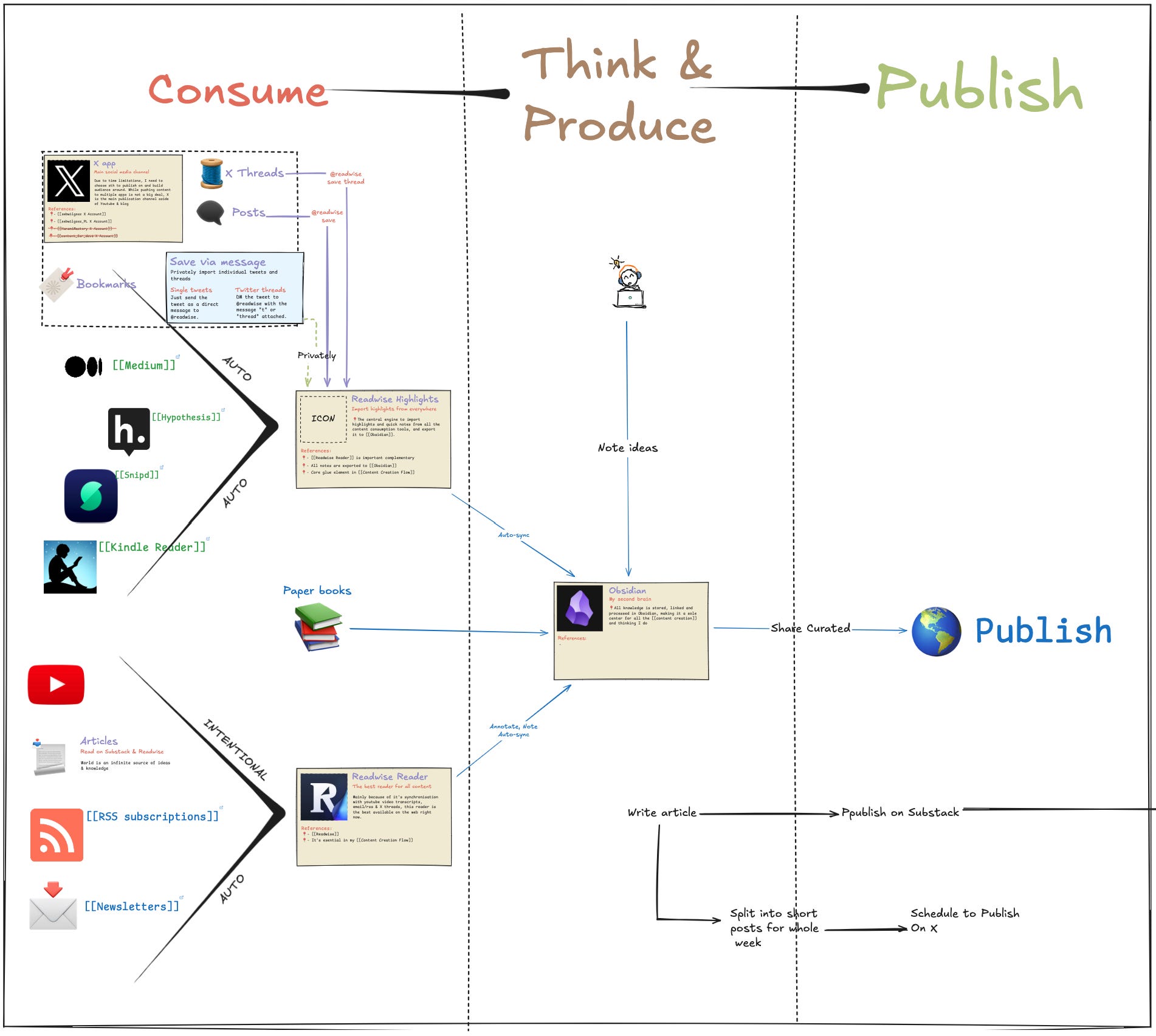
They sit in a “0. Brain Food“ folder and get pulled into notes when I need them.
I cannot count how much time this saves - prior to this I did not take any notes from anything I’ve watched or read, beacuse of friction required to save those. Not anymore though!
The AI part is small here, and that’s the point. The value is that the pipe exists and runs without me. Claude has dedicated folder in the obsidian PKM that he manages freely.
Fal.AI
My startups use Fal.AI or Claude API for everything currently and Well, it’s not about time saving, it’s about making impossible possible - If I’d need to develop this all myself, I’d never ship anything AI related :). Benefits? Infinite.
Main AI Workflows
Ship & Sell starter kit - a workflow helping me distribute and sell products I’m shipping. I’ve wrapped it into a product which my paid subscribers with a great discount and Founding members have for free.
Article → Shortform Drafts → Scheduling - This is one of the biggest time savers every week, because writing an article already takes a lot of time, and extracting key thoughts from what you already put togeteher, in order to publish as a note is tedious.
Weekly News fetching for market analysis
Weekly News research for Article ideas
Code-oriented workflows (tons of them)
Week planning & strategisation
Newsletter email curation.
Honorable mentions
Looka - Brand preparation tool I’ve used to create logo, color pallete and more for Engineer of Wealth
Gamma AI - presentation tool I use for live performances and slide-based talks. This reduced slide preparation time from 2 days down to 3 hours!
Descript - for video recordings, creating a transcript I could use to feed by content-repurposing is a must, and while I don’t use it currently, I leveraged it a lot when worked with my previous youtube channels, and most likely will get back to it soon!
That’s it for now, and what’s your top picks?
Footnote
Quick Note: Once a month I open a thread where you post what you built and the one call you’re unsure about, and you get the lever back. It’s called The Engine Room, it’s free, and edition 01 is open until September!.
Join and tell me which tool on this list you’d have add, cut or replaced!
Sebastian, I loved your point about mastering a few useful tools instead of chasing every new one. I use WriteStack too, and it’s been a lifesaver for staying consistent without becoming a “content hamster.”
Sebastian, this is a genuinely useful list. Thank you for sharing it!
I am currently working through a similar process of narrowing down (and building out) what I actually use and need, versus trying every new shiny thing that has no real value on my tech stack list. The two things There are two tools that I am building skills to integrate into my process, but still currently use manually right now as i still decide the level i want AI versus my own brain to play in my ecosystem's processes--is Perplexity for research, and ChatGPT for image generation (this one will be an integrated workflow soon). I couldn't do any of what I am building without Claude Cowork. I do think at some point soon, however, I will need to take the time to really learn Claude Code, and begin handing more over to it, though.
Thanks again for the post.